Wi-Fi Signal Strength Explained: What dBm Numbers Mean
Is -65 dBm good? A plain guide to Wi-Fi signal strength in dBm, what counts as strong or weak, why bars mislead, and how to fix a weak signal at home.
Your phone shows three bars in the back bedroom and video calls still break up. Three bars sounds fine. The actual number behind those bars tells a very different story.
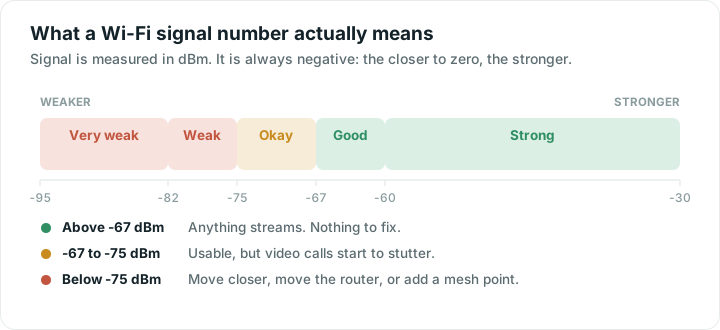
Wi-Fi signal strength is measured in dBm, and the numbers look odd because they are always negative. The closer to zero, the stronger: -45 dBm is a strong signal, -80 dBm is nearly nothing.
What the numbers mean in practice
| Signal | In plain words | What to expect |
|---|---|---|
| -30 to -60 dBm | Strong | Full speed, everything works |
| -60 to -67 dBm | Good | Comfortable for streaming and calls |
| -67 to -75 dBm | Okay | Browsing is fine, calls and 4K may stutter |
| -75 to -82 dBm | Weak | Slow, with dropouts |
| Below -82 dBm | Very weak | Barely usable |
Network engineers commonly treat -67 dBm as the floor for reliable video calls. That is why anything weaker than that is called "Okay" rather than "Good": it will load a web page perfectly well and still ruin a meeting.
Why a small change in the number is a big change in reality
The scale is logarithmic, which is the part that catches people out. Every 3 dB is roughly half or double the power. Every 10 dB is a factor of ten.
So going from -60 dBm to -70 dBm does not mean losing a sixth of your signal. It means the power reaching your phone is about one tenth of what it was. That is why a room that seems only slightly further away can feel completely different.
Why bars lie
Phones convert dBm into bars, but every manufacturer picks its own cut-offs. Four bars on one phone can be three on another standing in the same spot. Worse, the top bar usually covers an enormous range: everything from an excellent -50 dBm to a struggling -67 dBm often shows as full.
That is why a phone can show full bars right up until the moment things stop working. The number is the honest version; the bars are a summary written to look reassuring.
How to see the real number
- Android: apps can read the value directly. Wifify shows it live, updating as you walk, so you can watch it fall as you move away from the router.
- iPhone: Apple does not let any app read Wi-Fi signal strength, so no App Store app can show it. This is a platform rule, not a missing feature. Instead, watch how quickly your router answers, which rises in exactly the places signal falls. We wrote about this in why your iPhone will not show Wi-Fi signal strength.
- Mac: hold Option and click the Wi-Fi icon in the menu bar.
- Your router's app: many list connected devices with the signal the router sees from them.
The walk test
Numbers are most useful when you compare them, not when you stare at one.
- Stand next to the router and note the reading. This is your best case.
- Walk slowly to the room that bothers you, watching as you go.
- Note where the number falls off a cliff. That is your wall, your mirror, or your fridge.
- Repeat one room at a time until you have a rough map of the home.
Five minutes of this tells you more than any amount of guessing, because it shows you *where* the loss happens rather than just that it happened.
What actually weakens a signal
- Distance, steadily and predictably.
- Walls, especially brick, concrete and anything with metal in it. A rough rule is that each solid wall costs you around half the signal.
- Water, which includes fish tanks, radiators, and people. A room full of guests really is worse than an empty one.
- Mirrors and metal, which reflect rather than absorb.
- Floors, which are usually the worst of all, because they are thick and often reinforced.
Fixing a weak signal
In rough order of how much they help for how little they cost:
- Move the router. Central, high, and out in the open beats a cupboard in the corner every time. See router placement.
- Use the right band. Close to the router, 5 GHz is faster. Far away, 2.4 GHz reaches better. See 2.4 vs 5 vs 6 GHz.
- Remove one obstacle. Getting the router out from behind a television often gains more than a new device would.
- Add a mesh point halfway to the weak room. This is the real fix for a home that is simply too big or too solid for one router.
- Run a cable to anything that never moves. Every wired device leaves more airtime for everything else.
One thing signal strength does not tell you
A strong signal only means your phone can hear the router clearly. It says nothing about whether the router is busy, whether your channel is crowded, or whether your provider is having a bad evening. If your signal is strong and things are still slow, the problem is further down the chain: run a speed test and work through why Wi-Fi gets slow.
Quick answers
Is -65 dBm a good Wi-Fi signal?
Yes, -65 dBm is a good signal. It sits comfortably in the range where streaming and video calls work well. Anything from -30 to -67 dBm is healthy; below -70 dBm you should expect calls to start stuttering.
Why does my phone show full bars but the Wi-Fi is slow?
Bars only describe how clearly your phone hears the router, and the top bar covers a very wide range. A strong signal with slow speeds usually means a crowded channel, a busy router, or a problem with your internet provider rather than your Wi-Fi.
What is a bad Wi-Fi signal strength?
Below about -75 dBm is weak: expect slow speeds and dropouts. Below -82 dBm is effectively a dead zone. The practical threshold for reliable video calls is -67 dBm, so treat anything weaker than that as needing attention.
Why can my iPhone not show signal strength in dBm?
Apple does not make Wi-Fi signal strength available to apps, so no iPhone app can display it. You can see it on a Mac by holding Option and clicking the Wi-Fi icon, on an Android phone, or in your router’s own app.