Where to Put Your Router: 11 Placement Tips for Faster Wi-Fi
Where your router sits can matter more than your internet plan. These 11 placement tips cost nothing and often fix dead zones in minutes.
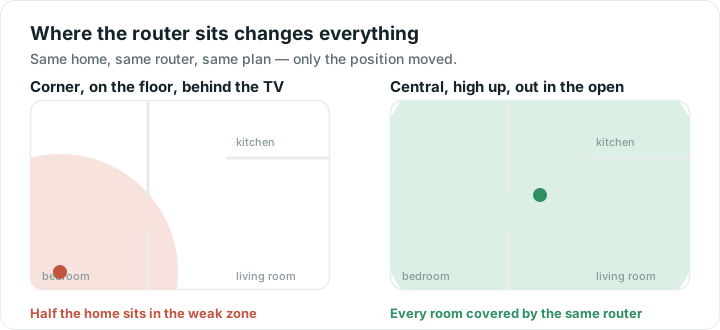
Most routers end up wherever the cable comes into the house: a corner, a cupboard, behind the television. That is usually the worst spot in the building. Moving it a few metres often makes a bigger difference than paying for a faster plan.
Here is why. Wi-Fi spreads outwards in every direction, like light from a bare bulb. Put the bulb in a corner cupboard and most of the light lands in the wall and the garden.
1. Put it near the middle of your home
Not the middle of the floor plan necessarily, but the middle of the rooms where you actually use the internet. If you spend every evening in the living room and every day in the back bedroom, aim for a point between them.
2. Raise it up
Signals travel outward and slightly downward. A shelf at chest height or higher beats the floor every time, and it also keeps the router out of the way of furniture and people.
3. Keep it in the open
Cupboards, drawers and TV cabinets block signal. So does tucking it behind the television, which is a large sheet of metal and glass. A router on top of a cabinet will beat the same router inside it, every time.
4. Stay away from metal and mirrors
Metal shelving, filing cabinets, fridges and large mirrors reflect Wi-Fi rather than letting it through. Half a metre of clearance is usually enough.
5. Mind the water
Water absorbs Wi-Fi well. Fish tanks, radiators, hot water tanks and a wall full of plumbing all weaken whatever is behind them. This is also why a crowded room is worse than an empty one: people are mostly water.
6. Keep microwaves and baby monitors apart
Older microwaves and some cordless phones and baby monitors use the same 2.4 GHz frequencies as Wi-Fi and cause dropouts while they run. If your Wi-Fi dies for ninety seconds at dinner time, this is why.
7. Point the antennas two ways
If your router has adjustable antennas, set one vertical and one horizontal. Phones and laptops hold their own antennas at different angles depending on how you are holding them, and mixing orientations covers both.
8. One floor up or down? Go near the stairs
Floors block more than walls, because they are thicker and often reinforced. In a two-storey home, a spot near the staircase on the floor where you spend the most time works well: the stairwell is the one place signal travels between floors without passing through concrete.
9. Test before and after
Guessing is unreliable, and moving a router is annoying enough that you want to do it once. Walk the house with a live signal meter first, note the weakest rooms, move the router, then walk the same route again. Wifify's Signal tab updates every second, so dead spots appear as you walk into them.
If you are on iPhone, Apple does not let apps read signal strength, so use response time instead: it rises in exactly the places signal falls. More on that in what signal strength means.
10. If one room is still weak, add a mesh point
Big homes and thick walls sometimes defeat any single router. A mesh system adds extra Wi-Fi points that behave as one network.
The mistake almost everyone makes is putting the extra point inside the weak room. A mesh point can only pass on the signal it receives, so one sitting in a dead zone has nothing to work with. Put it roughly halfway between the router and the weak room, where the signal is still strong.
11. Use a cable where you can
Televisions, games consoles and desktop computers do not move. On an Ethernet cable they are faster and steadier, and they stop competing with your phones and laptops for airtime. Every device you take off the air makes the Wi-Fi better for everything that is left.
How to tell placement was the problem
After you move the router, the giveaway is that the weak room improves while nothing else changes. Run a speed test in the same spot before and after, at a similar time of day.
If the far room is still poor but the room next to the router is fine, you have a coverage problem that placement alone will not solve, and a mesh point is the honest answer. If everywhere is slow, including next to the router, placement was never the issue: work through why Wi-Fi gets slow instead.
Quick answers
Where is the best place to put a Wi-Fi router?
Central to the rooms you use most, raised off the floor, and out in the open. Avoid corners, cupboards, the back of a television, and anywhere close to metal, mirrors or water. A router against an outside wall sends roughly half its coverage into the garden.
Does putting a router higher up really help?
Yes. Signal spreads outward and slightly downward, so a router on the floor sends a good share of its coverage into the ground. A shelf at chest height or above is a free improvement, and it also keeps the router clear of furniture.
Where should I put a Wi-Fi extender or mesh point?
Roughly halfway between the router and the weak room, not inside the weak room. An extender can only repeat the signal it receives, so one placed in a dead zone repeats a weak signal and helps very little.
Can I move my router away from the socket it plugs into?
Usually yes. A longer cable from the wall socket to the router costs very little, and many homes have more than one socket wired. Moving the router a few metres to a better spot is almost always worth more than the cable costs.