Find out why your Wi-Fi is slow. In plain words.
Wifify tests your speed, checks every link from your phone to the internet, and tells you exactly what to fix. No jargon, no account, no ads.
iPhone and Android apps coming soon to the App Store and Google Play.
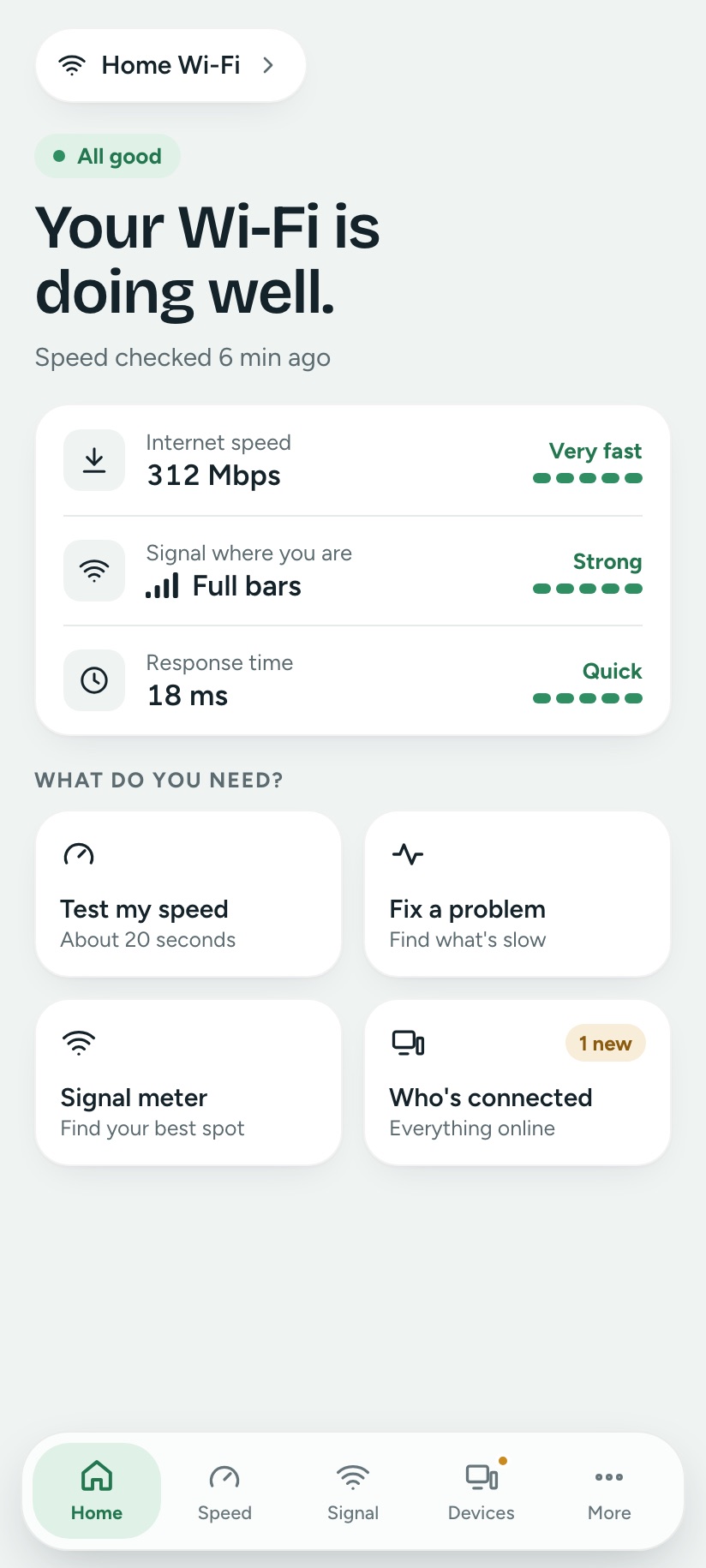
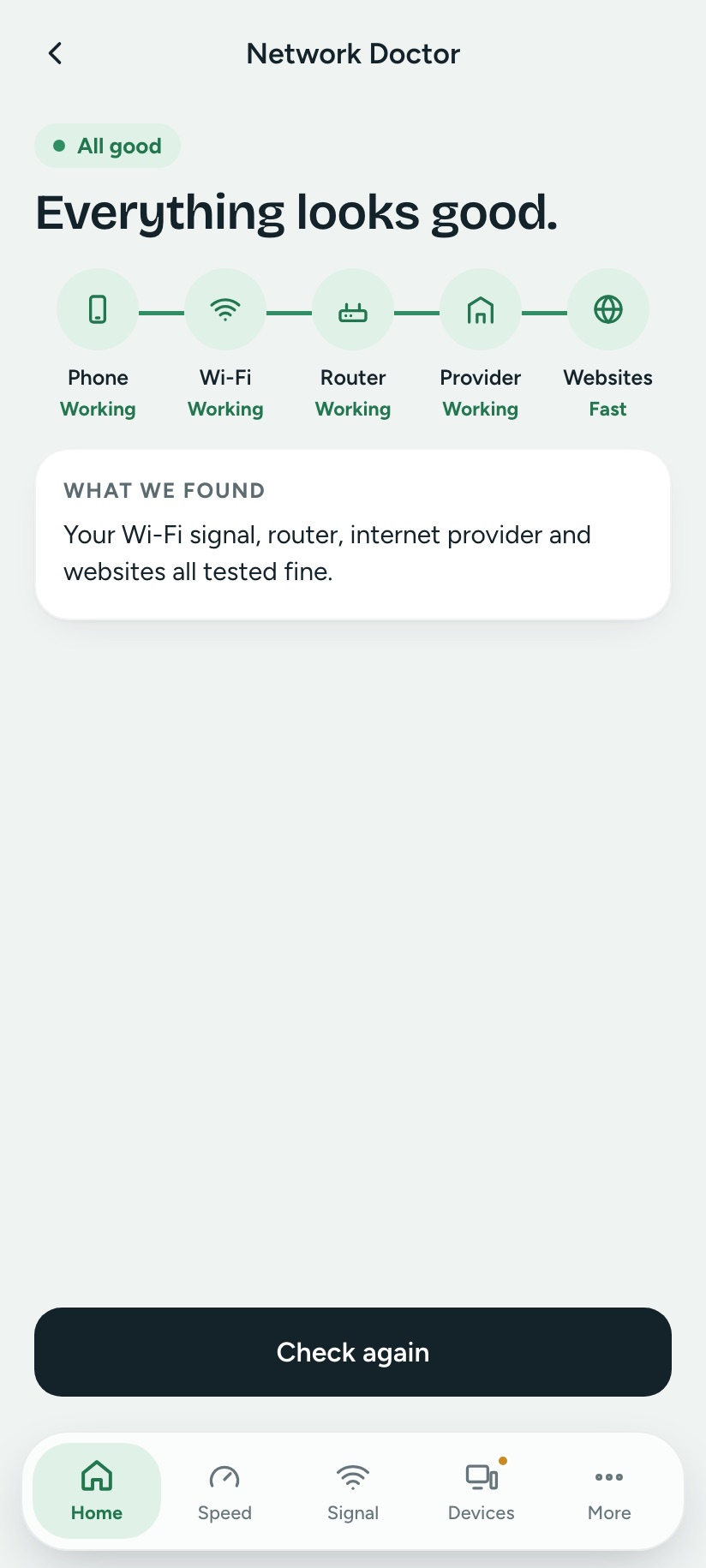
Five checks. One clear answer.
Most apps show numbers and leave the detective work to you. Wifify checks your phone, Wi-Fi signal, router, internet provider and websites in order, then tells you which one is the problem and how to fix it.
“Your internet is fine. Your Wi-Fi here is weak.”
The tools Wi-Fi experts use, explained like a friend would.
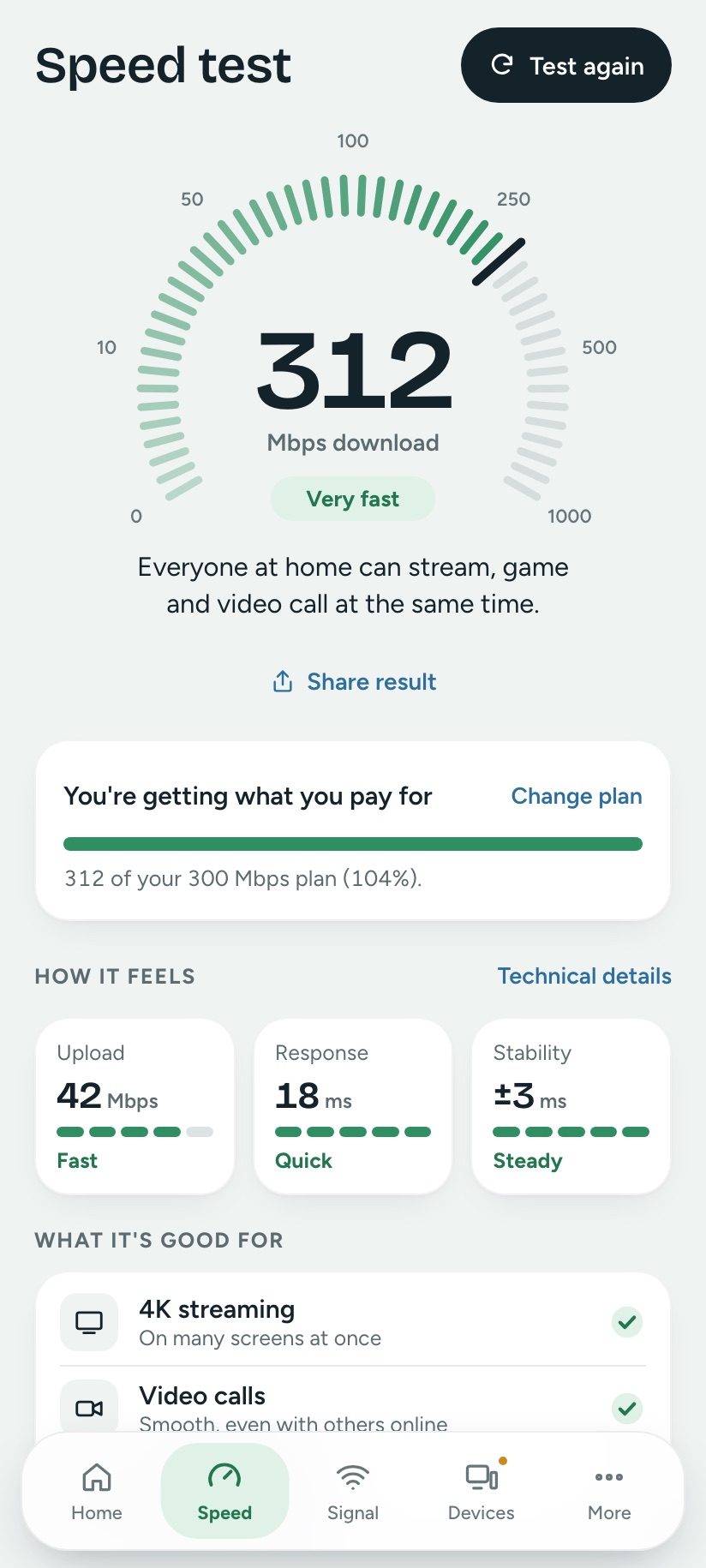
Not just a number. What it means.
312 Mbps sounds fast, but fast enough for what? Wifify tells you how many 4K screens you can run, whether calls will be smooth and if gaming will lag.
- Compares every test with the plan you pay for
- Builds a report you can send your provider
- Response time and stability, rated in plain words
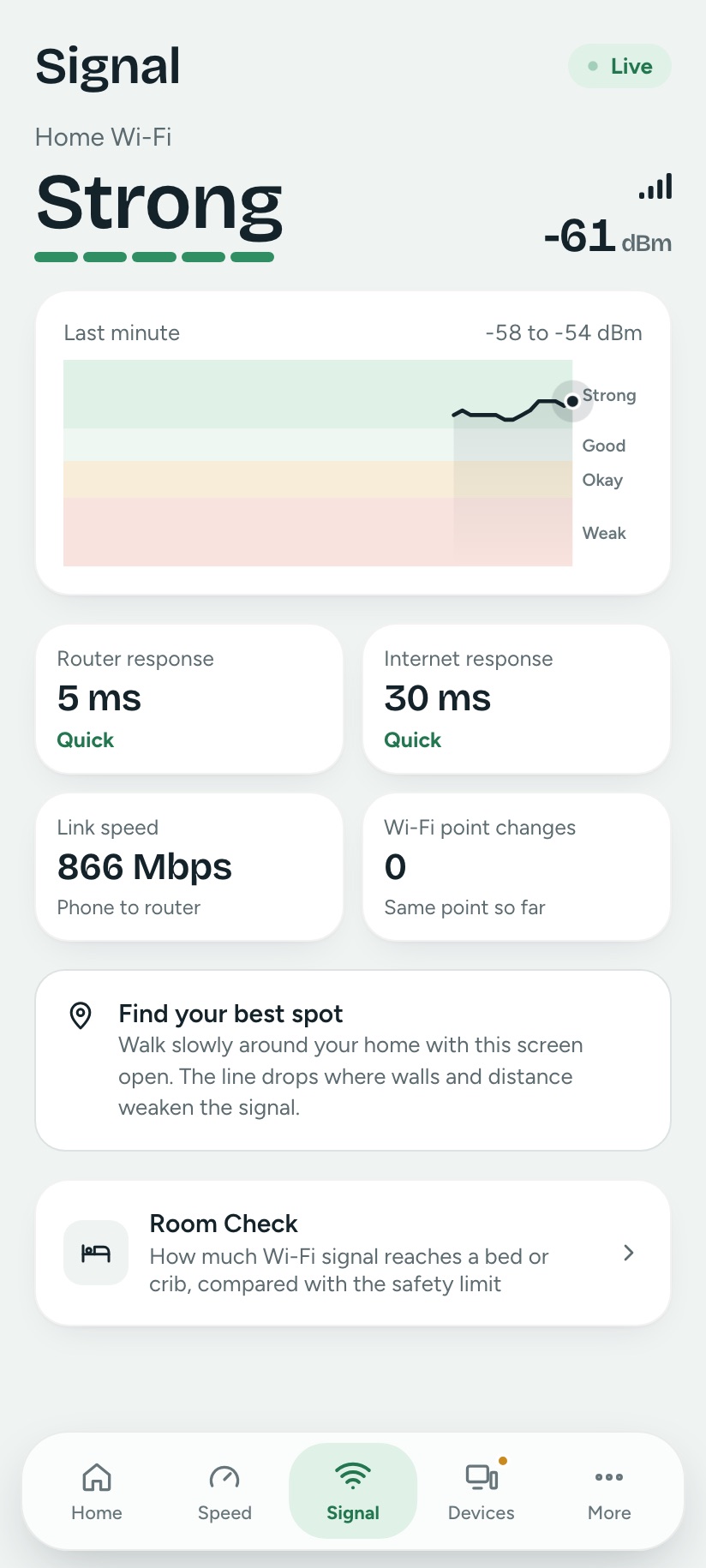
Walk around. Watch the signal. Find the dead spots.
The Signal tab updates every second with your signal strength, router response and internet response, so you can see exactly where Wi-Fi fades.
- Strong, Good, Okay or Weak, plus dBm for experts
- A one-minute graph of every step you take
- Spots when your phone switches to a closer Wi-Fi point
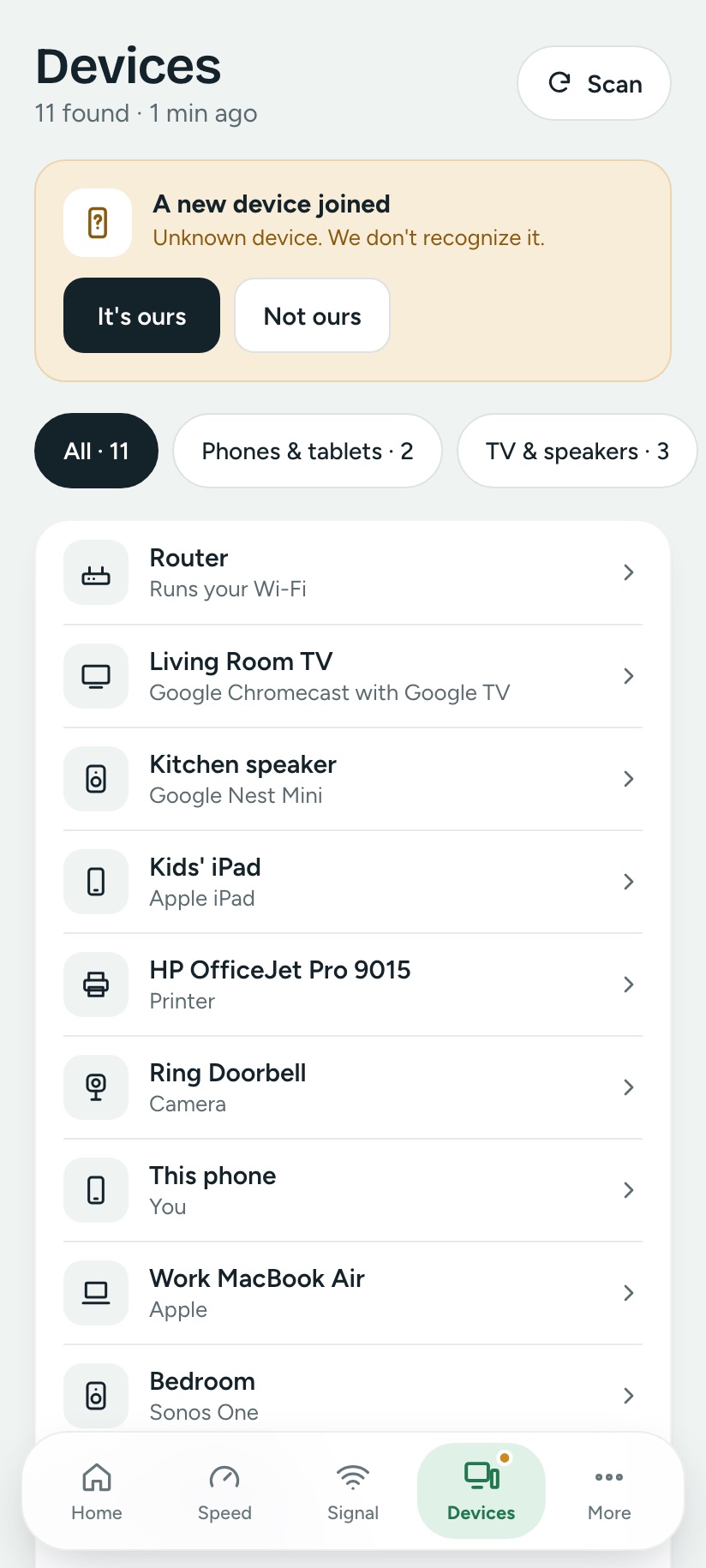
Every device, by its real name.
Wifify recognises devices from the names they announce, so you see “Kitchen speaker · Google Nest Mini”, not a list of numbers. Anything new gets flagged.
- Find TVs, speakers, printers, cameras and plugs
- Rename devices and see what each one can do
- Alerts when an unknown device joins
Channel advice
On Android, see how many neighbours share your Wi-Fi channel and which one is quietest. Your own guest network is never counted against you.
Room Check
Estimate how much Wi-Fi signal reaches a bed or cot, compared with the international safety limit, with simple ways to lower it.
Your connection
Wi-Fi version, security, band, link speed, router, provider and addresses on one clear page.
Network tools
Ping, trace route and website lookup for when you want to dig deeper.
One tap to your router
When a fix happens in your router’s settings, Wifify opens them for you.
Light and dark
A calm design that follows your phone’s theme, with plain words everywhere and technical details one switch away.
On mobile data too
Away from Wi-Fi, Wifify checks your mobile connection, provider and speed in the same plain words.
Apple Watch
See your latest speed on your wrist, and start a new test on your iPhone with a tap.
Share a result
Turn any speed test into a clean image to send your provider, your landlord or the family chat.
Built to give answers, not homework.
| What you get | Wifify | Typical analyzer apps |
|---|---|---|
| Tells you where the problem is | Phone → Wi-Fi → router → provider | Numbers you interpret yourself |
| Checks you get the speed you pay for | Every test, plus a provider report | Speed only |
| Language | Plain words first, details on request | dBm, jitter, BSSID |
| Router brand | Works with any router | Some features tied to one brand |
| Wi-Fi level at a child’s bed | Room Check | Not offered |
| Account, ads, tracking | None | Often an account or ads |
Your network stays yours.
Your speed history, device names and settings stay on your device. The one thing sent to us is an anonymous summary of each speed test, only the numbers, and you can switch it off. Speed tests run on Cloudflare’s servers, which see your internet address like any website does. Read the privacy policy.
Good to know
Is Wifify free?
Yes. Wifify is free, with no account, no ads and no tracking.
Does Wifify work on iPhone?
Yes. The iPhone app, with an Apple Watch companion, is coming soon to the App Store, alongside the Android app on Google Play. Apple does not let any iPhone app read Wi-Fi signal strength or scan nearby networks, so on iPhone the signal meter times how quickly your router answers instead, and channel advice is Android only. Until the apps arrive, the speed test and internet checks work in Safari.
Does it work on mobile data?
Yes. On mobile data the apps test your speed and response time, name your provider, and Network Doctor checks your phone, mobile connection, provider and websites. Wi-Fi-only features, like finding the devices on your network, wait until you are back on Wi-Fi.
Why does the app ask for location access?
iPhone and Android only share Wi-Fi details such as your network name with apps that have location access, and Android also requires it for signal strength and nearby networks. Wifify uses it only to read Wi-Fi information and never reads, stores or sends your location.
Where is my data stored?
On your device. Your speed history, device names and settings never leave your phone or browser. To build a public picture of broadband speeds, Wifify shares an anonymous summary of each speed test — only the numbers, never anything that identifies you — and you can switch that off in the app. Speed tests connect to Cloudflare’s public test servers, which see your internet address like any website.
How accurate is the speed test?
Wifify measures with several parallel connections to Cloudflare’s global network, removes the server’s own processing time from response time, and ignores the warm-up period, similar to other well-known speed tests. Results naturally vary with time of day, Wi-Fi signal and other devices using the connection.
Is Wi-Fi safe for my children’s bedroom?
Wi-Fi exposure at home is typically a tiny fraction of international safety limits. Wifify’s Room Check estimates the level at a bed or cot and suggests easy ways to lower it further if you would like to.
Fix your Wi-Fi, one plain guide at a time
I Ran Wireshark on Airplane Wi-Fi. Here Is What a Stranger Can and Cannot See
Open plane Wi-Fi has no password. So can someone read your messages? We captured our own laptop traffic at 35,000 feet to find out exactly what leaks and what does not.
Understand your Wi-FiWe Speed-Tested Airplane Wi-Fi at Cruising Altitude: 334 Mbps Over Starlink
Real measurements from a long-haul flight: 334 Mbps down, 24 ms response, per-site load times, what a device scan found, and why pages still feel slow at that speed.
Understand your Wi-FiWhy Your iPhone Won't Show Wi-Fi Signal Strength (and What Works Instead)
Android apps show -58 dBm. iPhone shows three curved bars and nothing else. Here is what Apple actually allows, which old tricks are dead, and what to measure instead.
Stop guessing. Know what to fix.
Run a speed test and Network Doctor right now in your browser. It takes about 20 seconds.