We Speed-Tested Airplane Wi-Fi at Cruising Altitude: 334 Mbps Over Starlink
Real measurements from a long-haul flight: 334 Mbps down, 24 ms response, per-site load times, what a device scan found, and why pages still feel slow at that speed.
Airplane Wi-Fi has a reputation: expensive, unusable, good for email if you are patient. That reputation is out of date, and we have the numbers.
We ran our own app, plus traceroute and a batch of timed page loads, on a long-haul flight partway through the trip. An Android phone and a laptop, both on the cabin network, nothing special.
The headline number
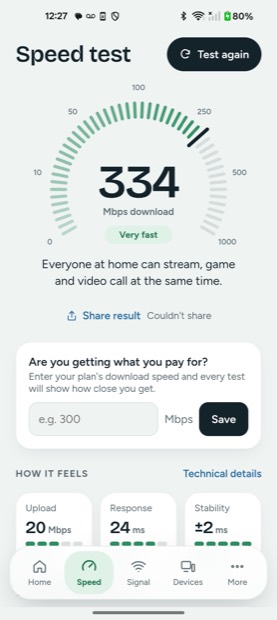
334 Mbps down. 20 Mbps up. 24 ms response time, and stability of plus or minus 2 ms.
That is faster than most homes in the United States, on a plane, shared with a cabin full of people. The upload is modest and the download is not the point; the surprise is the response time. In-flight Wi-Fi used to run through a satellite parked 36,000 km above the equator, and the physics of that round trip put a floor of roughly 600 ms under everything you did. Clicking a link felt like sending a letter.
Why it changed: look at the route
A traceroute from the laptop tells the story in three lines. After the cabin's own gateway, the next hops belong to Starlink — the reverse name of the first one outside the plane literally ends in starlink.com — and the traffic pops onto the public internet through Phoenix.
Starlink satellites fly about 550 km up instead of 36,000. The round trip shrinks by roughly a factor of sixty, which is why a plane can now show a response time that would be respectable on the ground.
The signal in the cabin is enormous
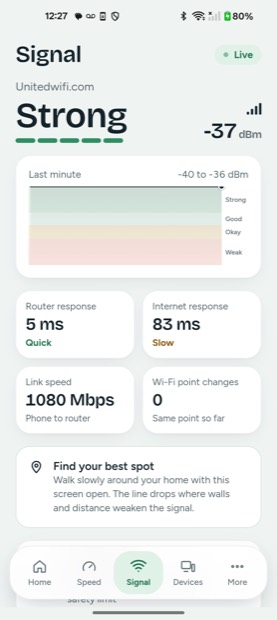
Minus 37 dBm. At home, anything better than -60 dBm counts as strong, and most people live somewhere around -55 dBm. The reason is simple: the access point is in the ceiling panel two or three metres from your head, with nothing in between. Our phone negotiated a 1080 Mbps link to it and answered the router in 5 ms.
So the weak link on a plane is never the Wi-Fi in the cabin. It is everything after it.
What that means for actual websites
Speed tests measure a fat, steady stream to one nearby server. Websites are the opposite: dozens of small requests to servers scattered around the world. We timed the first byte from ten popular sites:
| Site | DNS lookup | Connection | First byte |
|---|---|---|---|
| google.com | 29 ms | 60 ms | 143 ms |
| apple.com | 6 ms | 99 ms | 162 ms |
| instagram.com | 40 ms | 78 ms | 193 ms |
| wikipedia.org | 5 ms | 56 ms | 246 ms |
| amazon.com | 8 ms | 87 ms | 264 ms |
| bbc.com | 8 ms | 136 ms | 291 ms |
| github.com | 39 ms | 123 ms | 305 ms |
| youtube.com | 7 ms | 41 ms | 329 ms |
| netflix.com | 58 ms | 130 ms | 355 ms |
Nothing here is slow in the old airplane sense. But notice the gap between a 24 ms speed-test response and a 300 ms first byte. Every new connection pays for a DNS lookup, a handshake, and the distance to wherever that site actually lives. A page pulling from fifteen domains pays that toll fifteen times, and that is the lag you feel even while 334 Mbps sits unused.
There is a second effect the speed test hides. Idle pings from the laptop came back anywhere between 21 ms and 110 ms, averaging 42 ms. That spread is the satellite handover: the plane switches to a different satellite every few minutes, and the path rebuilds. Streaming absorbs it. A video call notices.
Who else is on the plane's Wi-Fi?
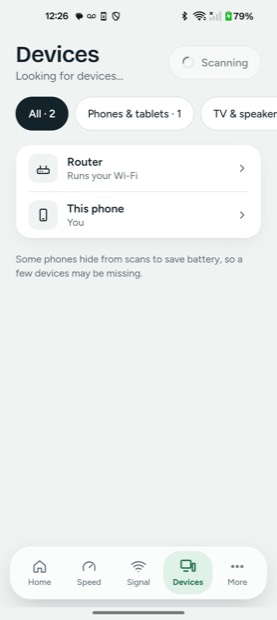
Two devices. The router, and us.
There were obviously more than two people online. What we are seeing is client isolation: the network lets every device talk to the internet but not to each other. It is a single setting, and it is the right one for a public network. Without it, every laptop with file sharing left on is visible to the rest of the cabin.
This is worth checking wherever you connect. Hotels and cafés very often leave isolation off. If a scan on hotel Wi-Fi shows you a list of other guests' laptops, phones and printers, then your device is on somebody else's list too. Turn off file sharing, and stick to sites and apps that use encryption.
Is sitting under the antenna safe?
A fair question when the meter reads -37 dBm, which looks alarming next to the -55 dBm you see at home.
That number is not transmit power. It is how loudly your phone hears the access point, and it is high because the antenna is close, not because it is powerful. Working backwards from the reading, the access point runs at roughly 100 mW — about the same as a home router, and a fraction of what your phone uses to reach a distant cell tower.
Converting the reading to power density at the seat gives roughly 0.001 W per square metre. The international public exposure limit at these frequencies is 10 W per square metre. So the cabin Wi-Fi is landing in the neighbourhood of ten thousand times under the limit, while the phone in your hand is a larger contributor than the ceiling panel.
What to do with a fast plane
- Download before you need it. Bandwidth is plentiful; each new connection is expensive. Grab the whole file or the whole episode in one go.
- Expect calls to wobble. Handovers produce short spikes. Audio survives them; video sometimes does not.
- Skip the VPN unless you need it. It adds another handshake and another hop on a link that is already paying for distance.
- Assume the network can see your traffic. Encryption, not the airline, is what protects it.
How we measured
Android phone and a laptop on the cabin network. Speed and signal readings come from Wifify, which uses Cloudflare's public speed test servers. The route came from traceroute, ownership of each hop from public routing records, and the per-site numbers from timed requests recording DNS, connection and first byte. Devices came from Wifify's network scan, which looks only at the network it is on and nothing else.
Numbers are from one flight on one aircraft. Your mileage, at 500 knots, will vary.
Quick answers
Is airplane Wi-Fi actually fast now?
On aircraft using low-orbit satellite service it can be. On this flight we measured 334 Mbps down, 20 Mbps up and a 24 ms response time, which beats a typical home connection. Older aircraft still use satellites far higher up, where response times around 600 ms make everything feel sluggish.
Can other passengers see my laptop on the plane Wi-Fi?
On this flight, no. A scan found only the router, which means client isolation is switched on and devices cannot reach each other. Many hotels and cafes leave that off, so it is worth checking with a network scan wherever you connect.
Why do websites feel slow when the speed test says 334 Mbps?
Because pages are built from many small requests, and each one pays for a DNS lookup, a handshake and the distance to the server. First-byte times on the plane ranged from 143 ms to 355 ms even though bandwidth was plentiful. Bandwidth decides how much you can move; latency decides how quickly anything starts.
Is the Wi-Fi signal in an aircraft cabin strong enough to be a health concern?
The reading is strong because the access point is a couple of metres away, not because it is powerful. Backed out from the measurement, it runs around 100 mW, similar to a home router, and the power density at a seat works out near 0.001 W per square metre against an international public limit of 10 W per square metre.