Why Is My Wi-Fi So Slow? 10 Causes and How to Fix Each One
Slow Wi-Fi usually comes down to one of ten causes, from a weak signal to a busy channel or a struggling provider. Here is how to tell which one, and fix it.
"The Wi-Fi is slow" can mean a dozen different problems. The trick is finding where the slowdown happens: between your phone and the router, inside the router, or out on the internet. Fix the wrong one and nothing changes.
Everything between your screen and a website is a chain. Any one link can be the slow one, and the other four will look innocent.
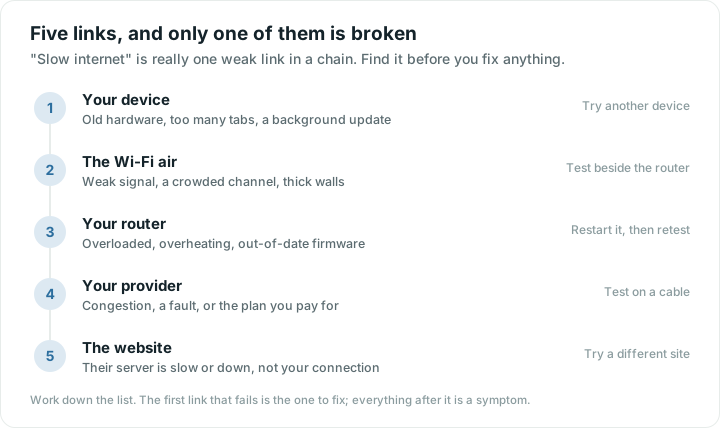
Here are the ten most common causes, in the order worth checking.
1. You're too far from the router
Wi-Fi gets weaker with every metre and every wall. Brick, concrete, mirrors, metal and water (fish tanks, radiators) block it most. If the problem only happens in certain rooms, this is almost always the cause.
How to check: stand next to your router and run a speed test, then run it again where the Wi-Fi feels slow. A big difference means signal, not your internet plan.
Fix: move closer, move the router somewhere more central and higher up (see our router placement tips), or add a mesh point halfway between.
2. Your internet plan is simply slower than you think
If speeds are low even right next to the router, compare the result with the plan you pay for. Many plans are "up to" a speed, and evenings can be slower when your neighbourhood is online.
Fix: test at a few times of day. If you consistently get far less than your plan, send the results to your provider. Wifify's speed test compares every result with your plan and can build a report for exactly that conversation.
3. Your Wi-Fi channel is crowded
Nearby networks on the same channel take turns with yours, like cars sharing a lane. In apartments, the 2.4 GHz band is often packed.
Fix: look at which channels your neighbours use and move to a quieter one in your router's settings. Our guide to finding the best Wi-Fi channel walks through it.
4. You're on the far-reaching band when the fast one is available
Most routers broadcast two bands: 2.4 GHz reaches farther but is slower, 5 GHz is faster but fades through walls. If your phone sticks to 2.4 GHz near the router, you're leaving speed on the table. See 2.4 vs 5 vs 6 GHz.
5. Someone (or something) is using all the bandwidth
A game download, a cloud photo backup or a 4K stream on the TV can swallow most of your connection.
Fix: check what's connected and pause big downloads. If you see a device you don't recognise, read how to see who's on your Wi-Fi.
6. The router needs a restart
Routers run for months without a break. Memory fills up, connections get stuck and everything slows down.
Fix: unplug the router (and modem, if separate) for 30 seconds, plug it back in and wait two minutes. If you need to do this weekly, the router may be failing.
7. The router is old
A router from 2015 may top out well below what a modern plan delivers, and it handles many devices poorly. Look for Wi-Fi 6 (802.11ax) or newer when replacing it.
8. Website lookups are slow
Before any page loads, your device looks up the site's address (DNS). A slow lookup service makes every page start late even when downloads are fast.
Fix: set your router's DNS to a fast public service such as 1.1.1.1 or 8.8.8.8.
9. A VPN or security app is in the way
VPNs route traffic through a distant server. That adds delay and can cap speed. Turn it off briefly and test again to compare.
10. The problem is your provider, not your home
Sometimes everything at home is fine and the provider is having a bad day. Restarting the modem helps occasionally; otherwise check your provider's outage page (using mobile data).
Slow on just one device?
If your laptop crawls while every phone flies, the problem is probably that device:
- Restart it and forget, then rejoin, the Wi-Fi network.
- Check for updates. Operating system and Wi-Fi driver updates fix a surprising number of speed problems.
- Look for background activity: cloud sync, system updates, a torrent client or a browser with 60 tabs.
- Check its Wi-Fi version. A laptop with Wi-Fi 4 (802.11n) will never match a Wi-Fi 6 phone on the same network.
- Turn off the VPN or security software briefly to compare.
Slow only at certain times?
- Every evening: often neighbourhood congestion on your provider's network, or a crowded Wi-Fi channel when neighbours get home. Test on a cable next to the router; if it's still slow, it's the provider.
- When someone streams or games: your connection is simply full. Consider a faster plan, or ask your router to prioritise video calls (often called QoS).
- At random: a failing router, an overheating modem or interference from a microwave or baby monitor.
A five-minute checklist
- Run a speed test next to the router. Slow there? Restart the router and modem, then test again.
- Still slow next to the router? Compare with your plan and contact your provider with the results.
- Fast next to the router but slow elsewhere? It's the Wi-Fi signal. Move closer, move the router or add a mesh point.
- Fast in some moments and slow in others? Check what else is connected and whether your channel is crowded.
- Only one device is slow? Restart and update that device.
When to call your provider (and what to say)
Call when the connection is slow next to the router or on a cable, after a restart, at several different times. Have ready:
- The download speed your plan promises
- Three or more test results with dates and times
- Whether the modem lights look normal
Wifify's Report for provider puts your plan and every recent test into one message you can paste into a support chat or email.
Signs it's time for a new router
- It's more than five or six years old, or doesn't support Wi-Fi 5 or newer
- You restart it every week to keep things working
- Speeds on a cable are fine, but Wi-Fi is slow everywhere, even in the same room
- It no longer receives firmware updates
The fastest way to find the cause
Checking all ten by hand takes a while. Wifify's Network Doctor checks each link in order (your phone, the Wi-Fi signal, the router, your provider and websites) and tells you in plain words which one is the problem, with fixes for that specific cause.
Quick answers
Why is my Wi-Fi slow but my internet is fine?
Usually because of distance, walls or a crowded channel between your device and the router. Test next to the router; if it is fast there, the problem is the Wi-Fi signal, not your plan.
Does restarting the router really help?
Often, yes. Restarting clears stuck connections and memory, and on many routers it also triggers a fresh choice of Wi-Fi channel. If you need to restart it every few days, the router may be overheating or simply too old.
How do I know if the problem is my Wi-Fi or my internet provider?
Run a speed test standing next to the router, ideally on a cable. If it matches the plan you pay for, your provider is fine and the problem is Wi-Fi coverage inside your home. If it is far below your plan even there, the problem is on the provider’s side.
Why is my Wi-Fi slow only in the evening?
Two usual suspects. Your Wi-Fi channel gets crowded when neighbours come home and switch their own networks on, and shared connections such as cable slow down at peak time. Testing at breakfast and again at nine in the evening tells you which one you have.