2.4 GHz vs 5 GHz vs 6 GHz Wi-Fi: Which Should You Use?
2.4 GHz reaches farther, 5 GHz is faster, and 6 GHz is the least crowded. Here is when to use each Wi-Fi band at home, in plain words.
You are standing in the garden and the video call drops. You walk into the kitchen and it recovers instantly. Your phone did not change. The band it was using did.
Most routers broadcast more than one Wi-Fi band. Sometimes they appear as separate networks, such as "Home" and "Home 5G". Sometimes they share one name and the router decides for you. Either way, each band is making the same trade in a different place.
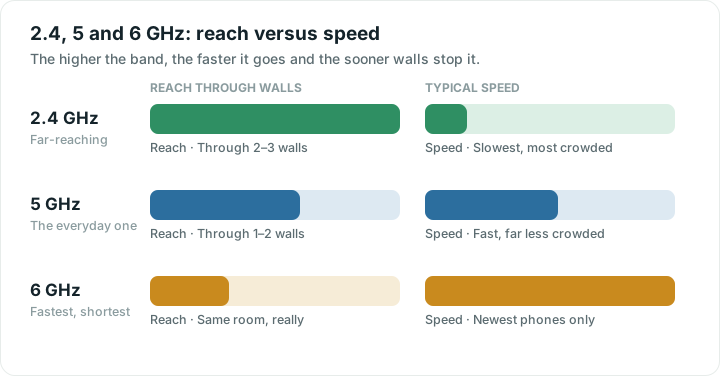
The trade in one line
Lower frequencies travel farther and pass through walls more easily. Higher frequencies carry far more data but are absorbed much faster. There is no band that does both.
| Band | Best for | Weakness |
|---|---|---|
| 2.4 GHz | Far rooms, the garden, smart plugs and cameras | Slower, and usually crowded |
| 5 GHz | Everyday use near the router: streaming, calls, work | Fades noticeably through walls |
| 6 GHz | Very fast, very quiet | Short range, newest devices only |
2.4 GHz: the far-reaching one
This is the band that gets to the shed. It passes through walls and floors better than the others, which is why nearly every smart plug, doorbell and camera uses it.
Two things hold it back. It carries less data, and it has only three non-overlapping channels, so in a block of flats it is often packed. It also shares its space with microwaves, older cordless phones and Bluetooth. If your Wi-Fi dies for ninety seconds while someone reheats soup, you are on 2.4 GHz.
5 GHz: the one you want most of the time
5 GHz carries much more data and has many more channels, so it is usually both faster and quieter. The cost is range. Signal drops off faster with distance, and each wall takes a bigger bite.
For most people in most rooms, this is the right band. The exception is the far corner of the house, where a weak 5 GHz connection can end up slower than a strong 2.4 GHz one.
6 GHz: new, fast and empty
Wi-Fi 6E and Wi-Fi 7 routers add 6 GHz: a lot of space, very little interference, very high speeds. It needs a compatible router and a recent phone or laptop. Range is shorter again, so think of it as a same-room band.
Which band should your device use?
- Same room as the router: 5 GHz, or 6 GHz if both ends support it.
- One or two walls away: usually 5 GHz. Worth testing both.
- Far end of the home, or outdoors: 2.4 GHz.
- Smart home gadgets: 2.4 GHz, and often that is their only option.
If your router uses a single name for every band, it is doing band steering and deciding for you. Most modern routers handle this well. The classic failure is a phone that latches onto 2.4 GHz after you walk to the far room and then stubbornly stays there when you come back. Turning Wi-Fi off and on again forces a fresh choice.
How to tell which band you are on
On Android, Wifify's Your connection screen shows the band, channel, Wi-Fi version and link speed. You can also check which provider you are on from any browser.
On iPhone, Apple does not share band or channel with apps, so you will not find this in any App Store app. Your router's own app is the place to look.
Should you split the bands into separate names?
Giving each band its own network name, such as "Home" and "Home-5G", hands the choice back to you. It is useful in two cases: when a smart device refuses to set up because it cannot see 2.4 GHz, and when a laptop keeps picking the wrong band.
The downside is that your phone no longer moves between bands as you walk around, so you may find yourself on the slow band in the fast room. For most homes, leaving one name and letting the router steer is the better default.
A quick reality check
Before you spend an evening on band settings, run a speed test next to the router and again in the room that bothers you. If both are close to your plan, bands are not your problem. If the far room collapses, that is a coverage problem, and no amount of band switching fixes distance. See why Wi-Fi gets slow for the full chain.
Quick answers
Is 5 GHz always better than 2.4 GHz?
No. 5 GHz is faster and less crowded, but it does not travel as far or through walls as well. Near the router 5 GHz wins easily. At the far end of the house a strong 2.4 GHz connection often beats a weak 5 GHz one.
Why does my Wi-Fi slow down when I use the microwave?
Microwaves work at roughly the same frequency as 2.4 GHz Wi-Fi, and a little energy leaks out. That interferes with the band while the microwave runs. Devices on 5 GHz or 6 GHz are unaffected.
Should I split my 2.4 and 5 GHz into two network names?
Usually not. One name lets your router move devices to the best band as you walk around. Split them only if a smart device cannot find 2.4 GHz during setup, or if a particular device keeps choosing the wrong band.
Do I need a 6 GHz router?
Only if your devices support it and you want maximum speed in the same room as the router. 6 GHz is fast and almost empty, but it has the shortest range of the three and older phones and laptops cannot use it at all.