What Is a Good Internet Speed? Mbps Explained for Streaming, Gaming and Work
How many Mbps do you actually need? A plain-language guide to download, upload and response time for streaming, video calls, gaming and working from home.
Internet plans are sold in megabits per second, but almost nobody can say what 100 or 500 Mbps actually buys. The honest answer is that most households need far less than they are sold, and care far more about steadiness than about the headline number.
Download, upload and response time
- Download is how fast data comes to you: streaming, loading websites, downloading apps. This is the number providers advertise.
- Upload is how fast data leaves: your side of a video call, sending files, cloud backups, live streaming.
- Response time, or ping, is how quickly the connection reacts. It decides whether calls and games feel smooth. See ping, jitter and packet loss.
How much speed each activity needs
The US Federal Communications Commission publishes minimum download speeds per activity, for one device at a time (FCC broadband speed guide):
| Activity | Minimum download |
|---|---|
| Email and browsing | 1 Mbps |
| HD video call | 1.5 Mbps |
| HD streaming | 5–8 Mbps |
| HD video conferencing | 6 Mbps |
| 4K streaming | 25 Mbps |
| Working or studying from home | 5–25 Mbps |
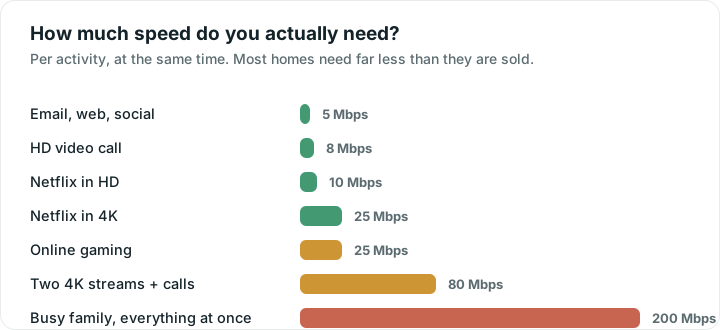
Those are per device. A household adds them up: two 4K televisions, a video call and a game download at the same moment can need 70 Mbps or more. But notice how small the individual numbers are. A single 4K stream, the heaviest thing most homes do, needs 25 Mbps. On a 500 Mbps plan you could run twenty of them.
A simple rule of thumb
| Household | Download that feels comfortable |
|---|---|
| 1–2 people, browsing and HD | 25–50 Mbps |
| Family with streaming and calls | 100–300 Mbps |
| Many 4K screens, big downloads, gamers | 300 Mbps and up |
For upload, 10 Mbps handles calls comfortably; 20 Mbps or more helps if several people are on calls at once or you back up a lot of photos.
Why buying more speed often changes nothing
This is the part providers do not advertise. Once your plan comfortably covers what your household does at once, extra megabits sit unused. Web pages do not load faster, because the delay is in the round trips, not the bandwidth. Video calls do not improve, because they need a few Mbps and a steady connection, not a big one.
Upgrading helps when you genuinely run out: several 4K streams plus large downloads at once, or an upload limit you keep hitting. It does not help when the real problem is Wi-Fi coverage, a crowded channel or bufferbloat, which is the far more common case.
The way to tell them apart takes two minutes: run a speed test standing next to your router. If the result is close to your plan, your plan is fine and everything you experience elsewhere in the house is a Wi-Fi problem. If it is far below even there, that is worth a call to your provider.
Why your test may not match your plan
- Wi-Fi. A phone two rooms away can see a fraction of your plan.
- Busy hours. Evenings are often slower on shared connections.
- The device. Older phones and laptops cannot reach high speeds even on fast Wi-Fi.
- Other people online. Anything downloading at that moment takes a share.
Mbps or MB/s? A common mix-up
Internet speeds use megabits per second (Mbps). Download managers and browsers usually show megabytes per second (MB/s). There are 8 bits in a byte, so divide by 8:
| Plan speed | File download speed |
|---|---|
| 50 Mbps | about 6 MB/s |
| 100 Mbps | about 12.5 MB/s |
| 300 Mbps | about 37 MB/s |
| 1,000 Mbps | about 125 MB/s |
How long a big download takes
For a 5 GB file, such as a game update, in ideal conditions:
| Speed | Time |
|---|---|
| 50 Mbps | about 13 minutes |
| 100 Mbps | about 7 minutes |
| 300 Mbps | about 2 minutes |
| 1,000 Mbps | under 1 minute |
Real downloads are often slower, because the server, your Wi-Fi and other people online all play a part.
Upload matters more than it used to
Video calls, cloud photo backups, sending large files and streaming all use upload. Many cable and older connections offer far less upload than download, so a family on calls while photos back up can hit the upload ceiling long before the download one. Fibre plans usually offer equal upload and download, which is a genuine reason to prefer them.
What speeds people actually get
Advertised speeds and real ones are different things. We publish real speed test results by provider and country, collected anonymously from people running the test on this site, so you can see what a plan actually delivers near you rather than what the brochure promises.
Are you getting what you pay for?
Enter your plan's speed once in Wifify and every test shows the percentage you actually get. If results stay well below your plan, the app can gather your recent tests into a short report to send your provider.
Quick answers
Is 100 Mbps fast?
For most households, yes. It comfortably covers several HD streams, a 4K stream and video calls at the same time. Only large families with several 4K screens and heavy downloads at once will notice a limit.
What upload speed do I need for video calls?
A few Mbps per call is enough for HD. 10 Mbps gives comfortable headroom, and 20 Mbps or more helps when several people are on calls or photos are backing up at the same time.
Will paying for a faster plan make my Wi-Fi better?
Only if you are genuinely running out of speed. If a test next to your router already matches your plan, a faster plan changes nothing: the slowness you feel elsewhere is Wi-Fi coverage, a crowded channel or response time, and none of those improve with more megabits.
What is the difference between Mbps and MB/s?
Mbps is megabits per second, which is how plans are sold. MB/s is megabytes per second, which is how downloads are usually shown. There are 8 bits in a byte, so a 100 Mbps connection downloads at about 12.5 MB/s at best.