Ping, Jitter and Packet Loss: What They Mean for You
Why a fast connection can still feel terrible. Ping, jitter and packet loss explained in plain words, with what counts as good and how to fix each one.
You pay for 300 Mbps. The speed test agrees. And your video call still sounds like someone talking through a fan.
This is the most common confusion in home internet: speed and steadiness are different things, and it is usually steadiness that ruins calls and games. A speed test measures how much you can move. It says very little about how it feels.
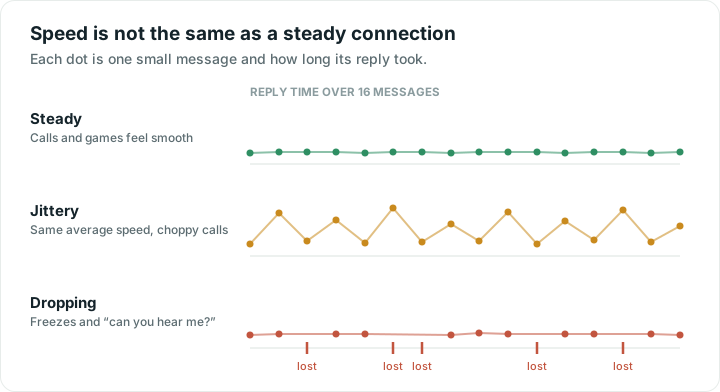
The three numbers that decide how it feels
Ping, also called response time or latency, is how long a small message takes to reach the other end and come back, measured in milliseconds. It is the delay before anything starts.
Jitter is how much that delay wobbles between one message and the next. Low jitter means every message takes about the same time. High jitter means some arrive quickly and some crawl.
Packet loss is messages that never arrive at all.
Look at the three rows in the diagram. All three could report an identical download speed. Only the first one is pleasant to use.
What counts as good
| Measure | Good | Usable | Trouble |
|---|---|---|---|
| Ping | Under 30 ms | 30 to 80 ms | Over 100 ms |
| Jitter | Under 10 ms | 10 to 30 ms | Over 30 ms |
| Packet loss | 0% | Under 1% | Over 2% |
For context: on a good home connection the internet answers in roughly 10 to 30 ms. Older satellite internet sat around 600 ms, which is why in-flight Wi-Fi used to feel so painful.
Why jitter ruins calls specifically
Video calls arrive as a steady stream of small pieces that must be played in order, immediately. There is no time to wait for a straggler.
So your device keeps a tiny buffer, a fraction of a second of held-back audio, to smooth out small variations. When jitter is low, that buffer absorbs everything and you hear a normal conversation. When jitter is high, pieces arrive outside the window, and the app has to choose between waiting, which is a freeze, or carrying on without them, which is the robotic chop.
Downloading a file does not care. It has all the time in the world and simply asks again for anything missing. That is why the same connection can download beautifully and still make you sound underwater.
What causes each problem
High ping is usually distance or a congested path. A server on another continent cannot answer quickly; physics sets a floor. It can also mean your connection type: older satellite links have high ping no matter how fast they are.
High jitter is usually local and is the most fixable of the three:
- A weak Wi-Fi signal, where your device retries constantly. See what signal strength means.
- A crowded channel, where everyone takes turns. See finding the best channel.
- Someone else saturating the connection, which is the classic evening-upload problem.
- An overloaded or overheating router.
Packet loss points at something genuinely broken: a failing cable, a dying router, a weak signal at the edge of range, or a problem at your provider. Small amounts happen normally. Consistent loss above a couple of percent needs fixing.
The one test that separates them
This is the trick worth knowing. Start a large upload, a cloud backup or a big file going out, then watch your ping while it runs.
If your response time was 20 ms idle and jumps to 200 ms the moment the upload starts, your connection suffers from bufferbloat: your router is queuing so much data that everything else waits behind it. It is extremely common, and it is why calls fall apart exactly when someone starts backing up photos.
The fix is a router setting, usually called Smart Queue Management, SQM, or QoS. Many modern routers and mesh systems have it. Turning it on typically costs a few percent of top speed and transforms how the connection feels.
How to check your own numbers
Run a speed test: it reports response time and stability alongside download and upload. Stability is jitter, shown as a plus or minus figure.
Then narrow it down:
- Test on a cable if you can. If ping and jitter go clean on Ethernet, the problem is your Wi-Fi, not your provider.
- Test next to the router on Wi-Fi. If that is fine and the far room is bad, it is coverage.
- Test at different times. Bad only in the evening usually means congestion, either your channel or your provider.
- Check the whole chain. The Wifify app pings your router and the internet separately, which tells you whether the wobble starts inside your home or beyond it.
What to do about each
- Weak signal: move closer, move the router, or add a mesh point.
- Crowded channel: change channel, or move to 5 GHz.
- Bufferbloat: enable Smart Queue Management on your router.
- Someone hogging the line: pause the backup, or use QoS to give calls priority.
- Consistent loss: swap the cable, restart the router, and if it persists, report it to your provider with the numbers.
That last point matters. "The internet is bad" gets you a script. "I have 3% packet loss and 90 ms jitter to your own gateway, at these times" gets you an engineer.
Quick answers
What is a good ping for gaming?
Under 30 ms feels responsive, and up to 50 ms is fine for most games. Above 100 ms you will notice lag. For gaming, steady ping matters more than raw download speed, so a 50 Mbps connection with low jitter beats a 500 Mbps one that wobbles.
Why is my internet fast but video calls are choppy?
Because calls depend on steadiness, not speed. High jitter means pieces of audio and video arrive at uneven times, and your app must either freeze or skip them. The usual causes are a weak Wi-Fi signal, a crowded channel, or bufferbloat when something else is uploading.
What causes packet loss on Wi-Fi?
Most often a weak signal at the edge of range, where messages are lost in the air and have to be resent. Other causes are a crowded channel, a failing cable or router, or a fault at your provider. Occasional loss is normal; consistent loss above about 2% needs investigating.
How do I fix bufferbloat?
Turn on Smart Queue Management, sometimes called SQM or QoS, in your router settings. It stops the router queuing so much data that everything else waits. You give up a few percent of top speed and get much steadier calls and games in return.