I Ran Wireshark on Airplane Wi-Fi. Here Is What a Stranger Can and Cannot See
Open plane Wi-Fi has no password. So can someone read your messages? We captured our own laptop traffic at 35,000 feet to find out exactly what leaks and what does not.
The Wi-Fi on a recent flight had no password. You connect, a login page appears, you tap "agree", and you are online. Our own app flagged it in red: this network has no password protection.
That raises the question everyone half-worries about and nobody actually tests: on an open network like this, can a stranger sitting three rows back read what I am doing? My messages? My email? This very page?
So we tested it. Properly, with the same free tool network engineers use, on our own laptop, at altitude.
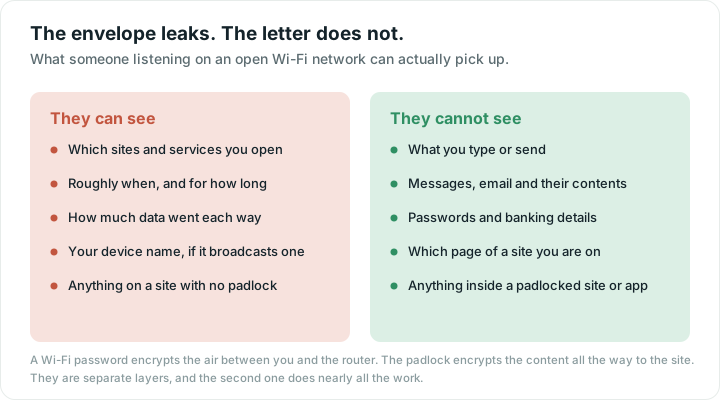
Here is the short version of what came back, before the detail.
The rules we set ourselves
Two lines we did not cross, and you should not either:
- We captured only our own laptop's traffic — our own data, on our own machine. We did not switch the Wi-Fi card into the special "listen to everyone" mode that would scoop up other passengers' frames. Reading other people's traffic is not a demo, it is wiretapping.
- We visited two harmless test sites we picked ourselves: one with no padlock (plain http) and one with a padlock (https).
Everything below is what a listener would see of our connection. The point is the pattern, not the pages.
What "the right tools" actually means
Less than you would think. Two pieces, both ordinary:
- A Wi-Fi adapter that can listen to all the traffic in the air, not just its own. Most built-in laptop chips will not, but a USB one that does costs about the price of a paperback.
- Capture software — Wireshark, or the built-in
tcpdumpwe used — free, and the same thing IT staff run to debug a slow office network.
That is the whole kit. It is not hacking wizardry, and importantly, none of it breaks encryption. It records what is already in the air. Whether that recording is readable is entirely down to one thing: whether *your* traffic was encrypted before it left your device.
Finding 1: which sites you visit leak in the clear
The moment we started capturing, before we even opened a browser, the laptop was already talking. Background apps check in constantly, and each one first asks "what is the address for this server?" — a DNS lookup — usually in plain text. We caught our own machine doing exactly that:
`` looked up: a messaging app's server looked up: a cloud provider's server ``
No content there. But a listener now knows this device uses a messaging app and a cloud service. When we loaded the padlock site, its name also appeared in the clear, in the opening handshake before encryption kicks in:
`` example.com ``
So the envelope is visible: which companies you connect to, and roughly when and how much. Not what is inside. Think of someone reading the addresses on your post without opening the letters.
Finding 2: a page with no padlock is an open postcard
We loaded a plain http site — no padlock. Here is a slice of what the capture recorded, straight off the wire:
`` GET / HTTP/1.1 Host: neverssl.com <title>NeverSSL - Connecting ... </title> ``
The whole page, readable. And this is the part that matters: if that page had a login form, the username and password would be sitting in the capture in plain text, exactly like the title above. This is the real danger of open Wi-Fi, and it has always been the same danger — sites and apps that skip encryption.
Finding 3: a page with a padlock gives up nothing
Then the honest test. We loaded an https site — the padlock — whose page shows the words "Example Domain" in big letters. If encryption is doing its job, those words should be nowhere in the capture. We searched the entire recorded conversation for them:
`` occurrences of "Example Domain" in the https capture: 0 ``
Zero. Not scrambled-and-recoverable — simply absent. The listener recorded the whole exchange and got a wall of ciphertext. The site's name, yes. A single word of its content, no.
So can a stranger read your messages?
No. Your chats, your email, your bank, your messages — those apps use the padlock. A listener on the plane would learn that your phone talked to those services, and nothing about what you said. The words ride inside the encrypted bucket that, in our test, gave up zero readable content.
What they *could* read is anything that skipped the padlock: an old http:// site, or a sloppy app that does not encrypt. Those still exist, and they are the reason to stay a little careful.
The login screen protects nothing
Worth saying plainly, because it fools almost everyone: the page that made you "log in" to the Wi-Fi (on a plane, in a hotel, at a café) is not security. It is a gate that holds your traffic at the door until you tap agree, then lets it through. It adds no encryption whatsoever. Being "logged in" to the network does not make your connection private — the padlock on each site does.
Should you use it? A 10-second decision
Open Wi-Fi is not all-or-nothing. Match what you do to what you can see:
| You want to... | On open Wi-Fi? |
|---|---|
| Read news, watch video, browse padlock sites | Fine. Content stays encrypted. |
| Log into email, bank or social apps | Fine in the official app, which refuses to run unencrypted. |
| Type a password on a web page | Only if it shows the padlock. No padlock, no password. |
| Enter card details on a checkout | Padlock only, and ideally save it for a trusted network. |
| Sign into a network that asks for a real account to "verify" you | Stop. Legitimate Wi-Fi never needs your email password. |
What actually keeps you safe on open Wi-Fi
- Look for the padlock. On a site without one, do not type anything you would not put on a postcard.
- Use apps, not random web pages, for anything sensitive. Banking and messaging apps refuse to run without encryption; a mistyped web address might not.
- Be suspicious of a network with no password that asks you to "sign in" with a real account. A fake hotspot named "Free Airport Wi-Fi" is the one genuinely nasty trick. Even then, your browser's certificate warning is a second line of defence — never click past one.
- A VPN closes the metadata gap too. It hides even which sites you visit, by wrapping everything in one more encrypted tunnel. Useful, not essential, for most people.
The good news you will not read elsewhere
The reason we could even see those DNS names is that our laptop used old-style plain-text lookups. Modern browsers are quietly fixing that: encrypted DNS and an encrypted handshake are becoming the default, which hides even the envelope. The gap is shrinking on its own.
Open Wi-Fi in 2026 is a caution, not a catastrophe. Check for the padlock, skip the sketchy networks, and your messages stay yours — three rows back or three time zones away.
How we tested
One laptop on the cabin Wi-Fi. Capture with tcpdump (the engine inside Wireshark), limited to our own device and to two test sites we chose. We never enabled monitor mode and never captured another passenger's traffic. The readable http page, the cleartext DNS and site names, and the zero-hit search of the https content are all straight from that capture.
Quick answers
Can someone on the same open Wi-Fi read my messages?
No. Messaging apps encrypt their content, so a listener on the network sees only that your device contacted a service, not any messages. In our capture, an encrypted site gave up zero readable content while its name was still visible.
Does logging into the Wi-Fi portal make my connection secure?
No. The login or "agree" page is just a gate that releases your traffic to the internet. It adds no encryption. What protects your content is the padlock (https) on each site and app, not being signed in to the network.
What can actually be seen on open Wi-Fi?
Which sites and services you connect to (the addresses), and the full contents of any site or app that does not use encryption. Everything behind a padlock stays encrypted, including passwords and messages.
Do I need a VPN on public Wi-Fi?
For most people it is helpful but not essential. The padlock already protects your content on nearly every site. A VPN mainly hides the remaining metadata, which sites you visit, by wrapping all traffic in one more encrypted tunnel.
What tools would someone need to snoop, and is it hard?
A Wi-Fi adapter that can listen to all nearby traffic plus free capture software like Wireshark. It is not exotic, but it only records what is already in the air, and it cannot break the encryption that padlock sites use.