2.4, 5 and 6 GHz explained
2.4 GHz reaches furthest, 5 GHz is the everyday one, 6 GHz is fastest and shortest. A plain guide to which Wi-Fi band to join, and when.
Two networks show up in your list with almost the same name: "Home" and "Home-5G". Nobody ever explained which one you are meant to join, so you picked one years ago and never thought about it again.
A band is a neighbourhood of frequencies
Wi-Fi is allowed to use a few separate stretches of radio spectrum. Each stretch is a band, named for roughly where it sits: 2.4 GHz, 5 GHz, and on newer equipment 6 GHz.
Your router can broadcast on more than one at the same time, and most do. Whether you see that as one network name or two comes down to a setting.
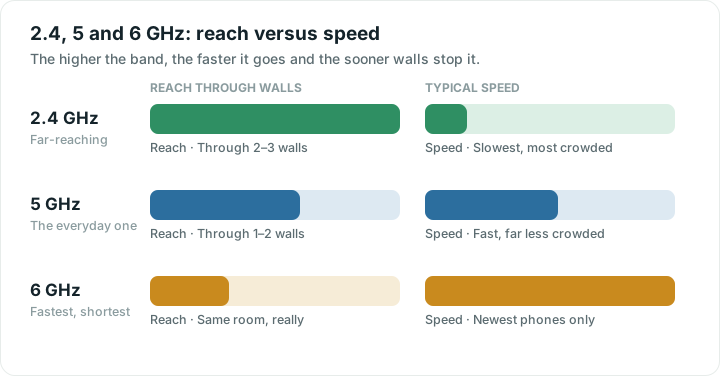
One rule explains nearly all the differences: higher frequencies carry more data but travel less well. Every band is a point on that trade-off. There is no best band, only the right one for where you are standing.
The three bands
| Band | Reach | Speed | Best for |
|---|---|---|---|
| 2.4 GHz | Through two or three walls | Slowest, usually the most crowded | Far rooms, the garden, smart plugs and cameras |
| 5 GHz | Through one or two walls | Fast, far less crowded | Everyday use: streaming, calls, work |
| 6 GHz | Realistically the same room | Fastest, very quiet | Recent phones and laptops near the router |
2.4 GHz is the old, far-reaching one. Lower frequency waves get through brick and around corners better, so this is the band that still works at the end of the garden. It pays for that twice: less capacity, and only three non-overlapping channels, which makes it the most congested band in most blocks of flats. Many cheap smart-home gadgets only speak 2.4 GHz, which is worth knowing when a new plug refuses to connect.
5 GHz is the everyday workhorse. Much more capacity, many more channels, noticeably faster in practice. It fades faster through walls and floors, so two rooms away it can end up slower than 2.4 GHz despite being the fast band.
6 GHz arrived with Wi-Fi 6E and Wi-Fi 7. A large amount of space, almost nobody using it yet, and very high speeds. Range is shorter again, and both ends need to support it. A 6 GHz router does nothing at all for a phone from 2021.
Which one should you join?
A practical guide rather than a law:
- Same room as the router. 6 GHz if both ends support it, otherwise 5 GHz.
- One or two walls away. Usually 5 GHz, but worth testing both.
- Far end of the house, upstairs, the garden. 2.4 GHz, and do not feel bad about it.
- A smart plug, doorbell or camera that will not connect. Almost certainly needs 2.4 GHz.
The honest version is that the fastest band is whichever one is still strong where you are. A weak 5 GHz connection loses to a solid 2.4 GHz one every time. Speed you cannot reach is not speed.
One name or two?
Many routers broadcast every band under a single network name and decide for your device which to use. That is band steering, and it works by nudging devices towards the better band as they move around.
It is usually fine, and it saves you thinking about any of this. It is also occasionally stubborn. A device that walked to the far bedroom on 5 GHz sometimes clings on at terrible signal rather than dropping to 2.4 GHz, because that decision is partly the device's, not the router's.
If one device repeatedly behaves badly, splitting the bands into separate names gives you manual control. The cost is that you now manage it yourself, and devices no longer switch as you walk about. Try steering first.
How to check what you are actually on
Guessing is easy and often wrong. Your phone's Wi-Fi settings or your router's app will usually name the band and channel you are connected to.
Then measure the thing you care about. Run a speed test in the room that matters, on one band, then the other, standing in the same spot. Two minutes of testing beats an hour of theory. If both bands are poor in that room, the band is not your problem. Coverage is, and why your Wi-Fi is slow is the better place to look next.
What choosing a band cannot fix
Picking a band changes the quality of the last few metres and nothing else. It cannot make your internet plan faster, cure a struggling provider, or repair a router that needs restarting every week. If every band is slow in every room, including on a cable, the answer lives somewhere else entirely. The tools will help you work out which side of the router the problem is on before you spend an evening changing settings.
Quick answers
Should I use 2.4 GHz or 5 GHz?
Use 5 GHz when you are near the router, and 2.4 GHz when you are far away or behind several walls. 5 GHz is faster and usually less crowded, but it fades more quickly through obstacles. The best band is whichever one is still strong where you are sitting.
Why do I see two networks with similar names?
Your router is broadcasting separate names for its 2.4 GHz and 5 GHz bands, so you can choose between them. Routers that use a single name are doing the choosing for you, a feature called band steering. Neither approach is wrong.
Is 6 GHz worth having?
It is excellent if your router and your device both support it and you are close by. It is very fast and almost empty at the moment. It does not reach far, and an older phone or laptop cannot use it at all, so it is not a fix for weak coverage.
Why won't my smart plug connect to my Wi-Fi?
Most inexpensive smart-home devices only support 2.4 GHz. If your router uses one name for all bands, the device may be trying to join a 5 GHz network it cannot see. Temporarily separating the bands, or using your router's app to force 2.4 GHz, usually solves it.