Speed, latency and jitter
Bandwidth is how wide the pipe is, latency is how fast it starts, jitter is how steady it stays. Why a fast connection can still feel terrible.
You pay for 500 Mbps and the speed test agrees. Your video call still breaks up, and the person at the other end keeps saying you went robotic for a second. Nothing about the number you paid for is wrong. It is just answering a different question from the one you have.
Three different questions
A connection has at least three separate qualities, and people collapse all of them into the word "speed".
- Bandwidth is how much can arrive at once.
- Latency is how long before anything arrives at all.
- Jitter is how consistent that delay stays.
A motorway makes the difference obvious. Bandwidth is how many lanes it has. Latency is how long the journey takes. Jitter is whether the journey takes the same time every day or swings between twenty minutes and an hour. A twelve-lane motorway with unpredictable traffic is still a bad commute.
Bandwidth: how wide the pipe is
Bandwidth is measured in megabits per second, and it is what your plan sells you. It decides how much data can flow at once, so it governs how many 4K streams your household can run, how fast a large file downloads, and how quickly a game updates.
It matters, and it is also the number people most often over-buy. Past a point, more bandwidth changes nothing you can feel. A video call uses a few Mbps. A 4K stream uses roughly 25. Loading a web page is a brief trickle. If four people are streaming and nothing stutters, extra lanes help nobody.
Latency: how fast it starts
Latency, often called ping, is the round trip. Your device sends a small message, something replies, and latency is how long that took, in milliseconds.
This is the number that decides how responsive things feel. Every web page is dozens of small round trips before anything appears on screen. A game sends and receives constantly. On a call, latency is the gap between someone finishing a sentence and you hearing it.
Rough expectations:
| Latency | How it feels |
|---|---|
| Under 20 ms | Instant. Nothing to improve. |
| 20 to 50 ms | Fine for everything, including most games. |
| 50 to 100 ms | Pages feel slightly slow to start. Calls are fine. |
| Over 150 ms | Noticeable lag, and conversations start to overlap awkwardly. |
Distance sets a floor you cannot buy your way past. Signals take time to cross an ocean, and no plan changes the speed of light. A server on another continent will always be further away than one down the road.
Jitter: how steady it is
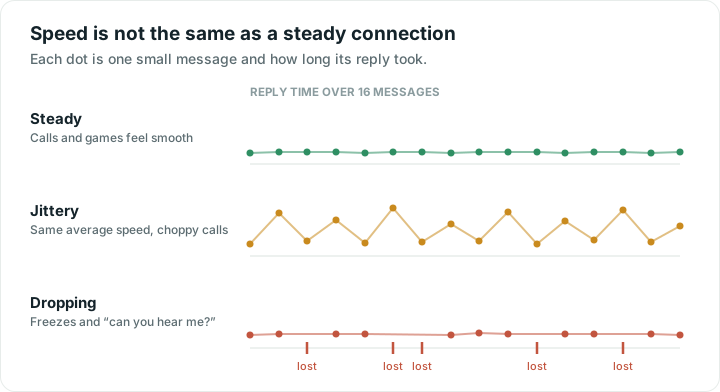
Jitter is the variation in latency. If replies come back in 20, 21, 19 and 22 ms, jitter is low. If they come back in 20, 95, 30 and 140 ms, the average still looks respectable and the experience is poor.
Steadiness matters because live audio and video cannot wait. Your call software holds a fraction of a second of sound in a buffer to smooth over small wobbles. When a piece arrives later than the buffer can cover, it is skipped, and that is the robotic chop. The connection was not slow. It was uneven.
A file download does not care about jitter at all. It simply waits. That is why the same connection can be excellent for downloading and poor for talking.
Packet loss: when things go missing
Sometimes a message never arrives. Downloads handle this invisibly by asking again. Live calls cannot, because by the time it could be re-sent the moment has passed, so lost pieces become gaps, freezes and "can you hear me?".
A small percentage of loss is enough to ruin a call while leaving a speed test looking perfectly healthy.
Why a fast connection can still feel bad
Because the thing going wrong is not bandwidth:
- A weak Wi-Fi signal causes retries, which show up as jitter and loss rather than as a lower speed.
- A crowded channel means waiting for a turn, which is jitter again.
- Someone in the house uploading something large can fill the outbound lane and delay everything else.
- The server you are talking to may simply be far away or busy.
What to actually do
Test for the right thing. A speed test that reports latency and jitter alongside download speed tells you far more than a download figure alone. Run it in the room where calls go wrong, not next to the router, because that room is the problem you are trying to describe.
If latency and jitter look fine and the call is still bad, the problem is more likely the app or the far end. If jitter climbs only in one room, that is Wi-Fi coverage. If it is poor everywhere, including on a cable, look outwards, and why your Wi-Fi is slow goes through both directions in order. The tools will give you numbers to put next to the feeling, which is also what a provider will ask for.
Quick answers
What is a good ping or latency?
Under 20 ms is excellent and feels instant. Anything up to 50 ms is comfortable for everything including most games. Over 150 ms becomes noticeable, especially in conversations, where people start talking over each other.
Why is my video call bad when my speed test is fast?
Because calls depend on steadiness rather than raw speed. Jitter and lost packets break up audio while leaving a download test looking healthy. A weak Wi-Fi signal or a crowded channel usually causes both.
What is jitter, in simple terms?
Jitter is how much the delay varies from moment to moment. Low jitter means replies take about the same time every time. High jitter means the average looks fine while individual pieces arrive late, which is what makes voices sound choppy.
Will a faster internet plan fix my lag?
Usually not. Lag is about latency and steadiness, and a bigger plan mostly adds capacity you were not using. It helps if your connection is genuinely full, for example when several people stream at once, but it will not shorten the distance to a server.