How a web page actually reaches you
A page crosses your device, the air, your router, your provider and the wider internet. Where delay comes from at each hop, and which parts you can fix.
You tap a link and wait a second and a half. It feels like one thing went slowly. It was really about six things in a row, most of them outside your house, and only one of them is the Wi-Fi you keep blaming.
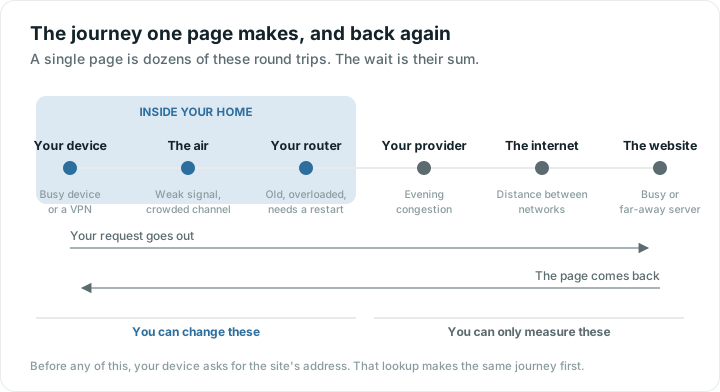
Before anything: the lookup
The names people type are not what machines route by, so the very first thing your device does is ask a DNS server to translate the name into an address.
That question travels the same chain as everything else below, and has to come back before the real request can start. A slow lookup service makes every page feel late to begin, even when the rest of your connection is fast. Because the answer is then remembered for a while, the second visit feels fine and you never suspect it. You can see what your own lookups return with a DNS lookup.
In practice this is messier than a neat first step: answers are often already cached, and a connection you are reusing skips it entirely. But putting it first is what makes the rest of the chain make sense.
The chain, one link at a time
1. Your device
Before anything leaves, your phone or laptop has to prepare the request. Usually that is instant. Occasionally it is not: a struggling device, a browser with a hundred tabs open, or a security tool inspecting traffic can all add delay before a single byte reaches the air.
2. The air
Your device turns the request into a radio signal and sends it to the router. This is the only wireless part of the entire journey, and it is the part people mean when they say "the Wi-Fi".
It is also where the largest and most fixable problems live: a weak signal, a wall in the way, a crowded channel. When the signal is weak, messages get resent, which costs time and looks exactly like a slow internet connection from the outside.
3. Your router
The router takes the request, notes who asked for it, and passes it on through the cable or fibre leaving your home. On the way back it does the reverse.
Routers are small computers, and they can be the bottleneck. An old one may not keep up with a modern plan. One juggling forty devices spends real effort just keeping track of them. One that has run for eight months without a restart may be quietly struggling.
4. Your provider
Your request now travels across your provider's network. This is where the "up to" in your plan gets tested. Evening congestion is real: capacity in your street or area is shared, and everyone is online at once.
You cannot tune this part. You can measure it, and you can report it with numbers rather than adjectives.
5. The wider internet and the server
From your provider, the request crosses between networks, sometimes a few hops and sometimes many, until it reaches the machine holding the page. That machine then does its own work: looking things up, building the page, sending it back.
Distance costs time in a way nothing can fix. A server on the other side of the world is tens of milliseconds away at best. Large sites hide this by keeping copies closer to you.
6. The trip back
Everything now happens in reverse, and a single page is rarely one journey. Text, images, fonts and scripts can be dozens of separate requests, some to companies you have never heard of. A page that feels slow is often waiting on one slow piece while the rest sits ready.
Where the delay usually comes from
| Hop | Typical problem | Can you change it? |
|---|---|---|
| The lookup | Slow DNS service | Yes, in router settings |
| Your device | Overloaded, VPN, old software | Yes |
| The air | Weak signal, crowded channel | Yes, often the biggest win |
| Router | Old, overloaded, needs a restart | Yes |
| Provider | Evening congestion, faults | No, but you can report it |
| Server and distance | Far away or busy | No |
How to tell which hop is yours
The test that sorts most of this out takes five minutes.
- Run a speed test standing next to the router. Slow there as well? The problem is the router, the provider or beyond, not coverage.
- Run the same test in the room that struggles. Much worse? That is the air, and moving the router beats buying anything.
- Test at a few different times of day. Bad only in the evening? That pattern points at congestion, either in your building or on your provider's network.
- If one site is slow while everything else is fine, it is that site. Nothing at your end will fix it.
If you want to know which network you appear to come from, which is useful when a site blocks you or behaves oddly, what's my IP shows the address the rest of the internet sees.
The reason this ordering matters is ownership. Some hops are yours, some belong to your provider, some belong to a company you have never dealt with. Fixing the wrong one changes nothing, which is how people end up paying for a faster plan that does not help.
Quick answers
What actually happens when I type a web address?
Your device asks a DNS server to turn the name into an address, then sends a request through your Wi-Fi, your router and your provider to the machine holding the page. That machine replies, and the page comes back the same way. A single page is usually dozens of these round trips.
What is DNS and why does it matter?
DNS translates the names people type into the numeric addresses machines use to route traffic. It runs before anything else, so a slow DNS service delays the start of every page. The answer is then remembered for a while, which is why repeat visits feel quicker.
Why is one website slow when everything else is fine?
Because the problem is at the far end, not at yours. The site's server may be busy, badly built, or a long way away. Changing your router, your plan or your Wi-Fi will not improve it.
Why is my internet slower in the evening?
Capacity is shared, both in your building's airwaves and on your provider's network, and evening is when everyone uses it. If speeds drop at the same time each night even on a cable, that is your provider's side. If it only affects Wi-Fi, a crowded channel is the likelier cause.