What Wi-Fi actually is
Wi-Fi is radio between your device and the router, and nothing more. Why walls and water block it, and why full bars can still mean no internet.
The Wi-Fi symbol on your phone is full, and the page still won't load. Or the signal drops to one bar and everything keeps working fine. Both happen all the time, and both make sense once you know that Wi-Fi and the internet are two separate things sitting next to each other.
Wi-Fi is radio
Your router is a small radio transmitter. Your phone, laptop and TV are radio transmitters too. They talk to each other using radio waves, the same kind of thing that carries FM radio or a walkie-talkie, just at a much higher frequency and over a much shorter distance.
Nothing travels through the air as "data" in any physical sense. The router wobbles a radio wave in a pattern, your phone reads the pattern and turns it back into ones and zeros, then your phone wobbles a wave back. That is the whole trick.
The short distance is deliberate. A router is meant to cover a home, not a town. That is a legal limit as much as a technical one: everyone's Wi-Fi shares the same public airwaves, so no single router is allowed to shout.
It is a conversation, not a broadcast
A radio station broadcasts. It does not know or care who is listening. Wi-Fi is different, because every device takes turns.
Only one device can transmit at a time on a given channel. The router and your devices hand the floor back and forth, fast enough that you never notice. But it does mean a home with twenty devices is a room with twenty people speaking politely, one at a time. Usually fine. Occasionally a bottleneck.
This also explains why one device doing something heavy, like a console downloading a game, can make everything else feel sluggish. It is not stealing your speed. It is simply talking more.
Why walls and water get in the way
Radio waves pass through some materials and get absorbed or bounced by others.
- Plasterboard and wood let waves through with modest loss.
- Brick, concrete and stone are much worse. A thick wall can cost you most of the signal.
- Metal reflects almost everything: foil-backed insulation, metal studs, filing cabinets, a fridge.
- Mirrors have a metal backing, so they behave like metal.
- Water absorbs 2.4 GHz especially well. Fish tanks, filled radiators, plumbing runs. People are mostly water too, which is why a crowded room measures worse than an empty one.
A rough rule engineers use is that every ordinary interior wall costs you roughly half the signal. It is not precise, and it depends entirely on what the wall is made of, but it is the right shape of expectation. Two walls is not slightly worse than one.
The microwave connection is not a coincidence either. A microwave oven heats food by shaking water molecules at around 2.4 GHz. Your 2.4 GHz Wi-Fi uses the same patch of spectrum, which is why an old or leaky microwave can interrupt Wi-Fi for its two minutes of running.
Wi-Fi is not the internet
This is the part worth holding on to.
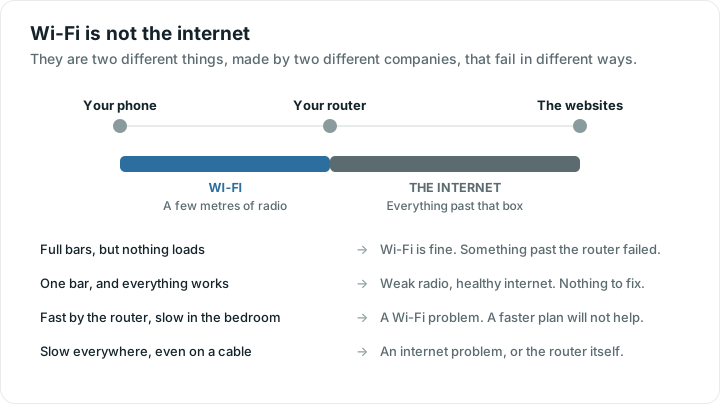
Wi-Fi is the last few metres. It is the wireless link between your device and the box in your hallway. That is all it is.
The internet is everything past that box: the cable or fibre leaving your home, your provider's network, and the millions of machines beyond it. Different company, different technology, different ways of failing.
So:
- Full bars, no internet. The radio link is perfect and something past the router has failed. Often the provider.
- One bar, everything works. The radio link is weak but good enough, and the internet behind it is healthy.
- Fast next to the router, slow in the bedroom. That is Wi-Fi.
- Slow everywhere, including on a cable. That is the internet, or the router itself.
That single split is the most useful thing you can carry around. If you are chasing a slow connection, why your Wi-Fi is slow works through both sides in order.
What to do with this
You cannot see radio waves, but you can measure their effects. Run a speed test standing next to the router, then run the same test in the room that struggles. If the two results are close, your Wi-Fi is doing its job and any problem lives further out. If the second one collapses, you have a coverage problem, and paying for a faster plan will not fix it.
The rest of these chapters take each piece in turn: the lanes Wi-Fi uses, the bands, what signal numbers mean, and where delay actually comes from. The tools are there when you want to check a number rather than guess at one.
Quick answers
Is Wi-Fi the same thing as the internet?
No. Wi-Fi is only the wireless link between your device and your router, usually a few metres. The internet is everything beyond the router, which is why you can have a perfect Wi-Fi signal and no internet at all.
Why does my Wi-Fi get worse in certain rooms?
Because radio waves lose strength with distance and get absorbed or reflected by what they pass through. Brick, concrete, metal, mirrors and water block Wi-Fi the most. A rough rule is that each ordinary wall costs you around half the signal.
Can my microwave really affect my Wi-Fi?
Yes, though only while it is running and only on the 2.4 GHz band. Microwaves work at around the same frequency Wi-Fi uses there, so an older or poorly sealed oven can cause dropouts. Switching a device to 5 GHz avoids it.
Does Wi-Fi go through floors as well as walls?
It does, but a floor is usually a thicker, denser obstacle than a wall, especially with concrete or underfloor pipes. Signal also spreads outward and slightly downward from the router, so a router upstairs covers downstairs better than the reverse.