Mesh, extenders and why placement wins
Moving the router often beats buying hardware. How extenders and mesh really differ, and how to tell which one your home actually needs.
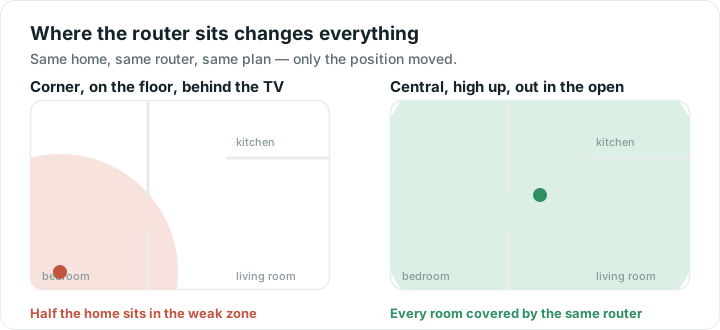
The router lives where the cable enters the house: a corner of the hallway, on the floor, behind a cupboard door. Nobody chose that spot. The installer put it where the socket was, and it has sat there ever since, which is why half the house has weak Wi-Fi.
Why moving beats buying
A router broadcasts in every direction. Put it in the corner of a building and a large share of that signal goes into the garden or the neighbour's flat. Put it in the middle and the same radio covers far more of the rooms you actually use.
Nothing about the hardware changed. The coverage did.
That is the argument for trying placement first. It costs nothing, takes ten minutes, and it is often the whole problem. Buying a more powerful router and leaving it in the corner mostly improves the signal in your neighbour's kitchen.
The rules are short:
- Central, not cornered. Aim for the middle of the rooms you use, not the middle of the floor plan.
- Up, not down. Signal spreads outwards and slightly downwards. A shelf at chest height beats the floor.
- Out in the open. Cupboards, drawers, media cabinets and the back of a TV all cost you signal.
- Away from metal and mirrors. Both reflect. A large mirror or a fridge can shadow a whole room.
- Away from water. Fish tanks, filled radiators, hot water tanks.
- Not beside the microwave. 2.4 GHz Wi-Fi shares frequencies with it.
If the cable location will not allow any of that, a longer cable from the socket to a better spot is cheap, dull and effective.
When placement is not enough
Some homes defeat a single router wherever you put it: thick stone walls, a long thin layout, three floors, a converted loft, a garden office. At that point you need a second radio closer to the problem, and there are two ways to get one.
What an extender actually does
An extender, sometimes called a repeater, listens to your router's signal and re-broadcasts it. It is simple, it is cheap, and it does genuinely extend coverage.
Two things are worth knowing before you buy one.
First, it repeats what it receives. Put it in the weak room and it rebroadcasts a weak signal, so now you have poor Wi-Fi in two places. It has to sit where the signal is still decent, roughly halfway, which is often not where you wanted it.
Second, a basic extender talks to the router and to your devices using the same radio, taking turns. Everything passing through it is effectively sent twice, so the throughput you get through an extender is roughly halved. That is a fair trade in a room that had nothing, and a poor one in a room that was merely mediocre.
Extenders also often create a second network name, so your phone clings to the old one as you walk and you end up switching Wi-Fi off and on to force it across. Better models avoid this. Many do not.
What mesh does differently
A mesh system replaces your router with two or three units designed to work as one network.
The differences that matter:
- One network name. Your device hands off between units as you move, without you doing anything. Handoffs are not always instant, but they are handled.
- A dedicated path between units. Better mesh systems keep a separate radio, or a wired link, for unit-to-unit traffic, which avoids the halving that affects extenders.
- They coordinate. Channels and steering are managed across the whole system rather than each box deciding alone.
The cost is money, and the fact that you are replacing the router rather than adding to it. Mesh is the right answer for a genuinely difficult home. It is an expensive answer to a router sitting in a cupboard.
If you can run a cable to the second unit, do. A wired mesh point, or even a second access point, is far better than any wireless link, because the hop between units stops competing for airtime. Powerline adapters are a middle option: sometimes good, and very dependent on your wiring.
Work out which you need
Before spending anything:
- Run a speed test next to the router. That is the best your Wi-Fi can do. If it is already low, coverage is not your problem, so look at the router, the plan or the provider.
- Run the same test in the room that struggles. A large gap means coverage.
- Move the router, higher and more central and out of the cupboard, then test the weak room again.
- Only if the gap survives a genuinely good position is more hardware the answer.
Do the tests at the same time of day, standing in the same place, or you are comparing noise. The tools will give you the numbers to compare. And if the connection is slow even standing next to the router, why your Wi-Fi is slow is the better starting point, because no amount of mesh fixes a problem that lives outside your home.
Quick answers
Where is the best place to put my router?
Central to the rooms you actually use, raised to at least chest height, and out in the open rather than in a cupboard or behind a TV. Keep it away from metal, mirrors, water tanks and the microwave. A longer cable from the socket is usually cheaper than new hardware.
What is the difference between a mesh system and an extender?
An extender rebroadcasts your existing router's signal, usually on one network name of its own and at roughly half the throughput. A mesh system replaces your router with units built to act as a single network, handing devices between them and keeping a better path between units.
Do Wi-Fi extenders halve your speed?
A basic one roughly does, because it receives and resends everything on the same radio. Better models use a second radio or a wired link to avoid that. In a room that previously had no usable signal, half of something still beats nothing.
Should I buy a mesh system or just move my router?
Move the router first, since it costs nothing and often fixes the problem entirely. Test the weak room before and after. If a genuinely good position still leaves dead areas, that is when mesh is worth the money.